Designing Custom Audio Triggers for Multiplayer Gaming

Multiplayer game nights thrive on clear communication, shared comedic timing, and memorable cooperative moments. Whether coordinating defensive positions in a tactical shooter, exploring an open-world sandbox with friends, or navigating an online tabletop campaign, audio shapes how every participant experiences the group adventure. While standard in-game sound effects handle ambient environments and combat noise, adding personalized audio triggers can turn an ordinary evening into an engaging entertainment event.
Custom audio cues allow players to broadcast short vocal clips, practical tactical callouts, or musical stingers directly into team voice channels at the tap of a button. When used thoughtfully, these soundbites highlight major victories, provide instant tactical alerts, or break up tense pauses during challenging matches. Setting up a dependable system requires clean sound recording, careful audio channel management, and responsive trigger controls that never disrupt gameplay.
Planning Your Sound Library and In-Game Cues
The foundation of an effective sound setup is deliberate curation. It is tempting to collect dozens of internet clips and map them across an entire keyboard, but an overcrowded soundboard quickly turns into chaotic noise. When players struggle to locate the correct hotkey in the heat of battle, accidental triggers can interrupt critical team communications or cause frustrating distractions.
Begin by defining the specific purpose of your audio triggers. If your group enjoys roleplay and storytelling, focus on short ambient effects, celebratory fanfare, or distinct character phrases. For fast-paced competitive games, prioritize brief cues that signal tactical maneuvers, regrouping commands, or strategic countdowns. Keeping each sound clip short ensures that team dialogue remains audible and clear throughout the match.
Organizing sound files inside structured folders makes long-term management straightforward. Group audio files by theme, such as tactical alerts, celebratory musical stingers, and casual humor. Using consistent uncompressed or standard high-fidelity audio formats prevents playback delays when a trigger key is pressed during intense gaming action.
Capturing Clean Voice Lines and Sound Effects
While downloadable sound packs offer quick variety, creating original voice clips and homemade sound effects gives your gaming group a personal identity. Recording custom catchphrases, inside jokes, or dramatic callouts creates shared memories that standard sound libraries cannot replicate. However, muffled recordings filled with room echo or background hum can quickly irritate listeners in voice chat.
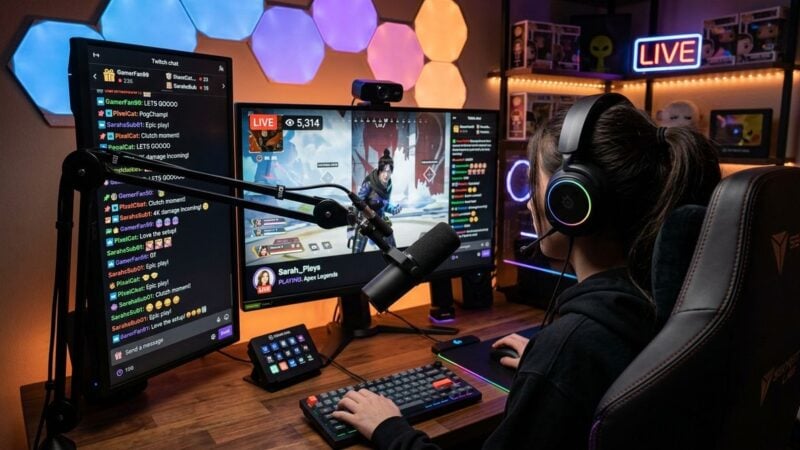
Achieving clean speech capture requires attention to microphone placement and room acoustics. Positioning a dynamic or condenser microphone close to your mouth on an adjustable boom arm prevents keyboard clatter and desk vibrations from muddying the recording. Helpful guides and hardware advice from Microphone Authority can assist in selecting the right microphone style and acoustic accessories for clear vocal capture. Proper microphone technique ensures your custom cues sound punchy and intelligible over intense game noise.
After capturing your raw audio, use a basic audio editor to trim unwanted silence from the beginning and end of each track. Apply gentle volume leveling to ensure every voice line plays at a uniform level. Normalizing your files prevents sudden volume spikes that could startle teammates who have their headphone volume turned up high.
Routing Audio Channels Without Disrupting Team Chat
The primary technical challenge when using custom sound triggers is managing audio routing. If you play clips through open computer speakers, your microphone picks up a delayed, distorted echo that ruins voice clarity. If you pipe sounds directly into your communication software without monitoring them, you risk speaking over teammates or missing important in-game audio cues.
Virtual audio cables and software mixers solve this problem by separating distinct audio streams. One virtual path handles your natural speaking microphone, a second path manages your soundboard player, and a third carries your game audio and incoming voice chat. Combining your microphone and soundboard into a single virtual input allows both signals to reach your friends simultaneously without unwanted crosstalk.
Balancing multiple audio streams on a single computer workstation requires understanding input-output relationships. Readers looking to explore detailed hardware and software mixing techniques can consult our guide to streaming games and acoustic music, which examines routing options for simultaneous voice and instrument handling. Establishing structured routing lets you adjust how loudly you hear clips in your own headphones independently from what your squad hears.
Automating Triggers with Custom Software Scripts
Speed and ease of use are crucial when triggering sounds during active gaming. Alt-tabbing out of a match to click a software window is impractical and leaves your character vulnerable. Many basic soundboard programs offer hotkey binding, but standard utilities often struggle to register keystrokes when games run in fullscreen mode, or they conflict with existing game control layouts.
Creating lightweight custom scripts or small desktop utilities gives you full control over how and when sound effects play. Writing a personalized background program allows you to map secondary keypad keys, pedal switches, or unused mouse buttons directly to audio playback commands without stealing window focus. For those interested in mastering the programming concepts needed to build robust background utilities, the technical development guides at primrose-soft.com offer valuable direction on creating reliable software tools that handle system inputs effectively.
Before using custom audio tools in a live match, review these practical setup steps:
- Assign trigger shortcuts exclusively to secondary keys or unused modifier combinations.
- Test hotkey responsiveness while running games in borderless display mode.
- Configure a single panic key that immediately silences all active sound playback.
- Verify that your background script runs efficiently without causing frame drops.
Fine-Tuning Levels for Long Gaming Sessions
Even well-crafted audio cues lose their charm if they play too loudly or too frequently. Listener fatigue develops quickly during multi-hour gaming sessions. If sound effects overpower natural conversational volume, squad members will mute player audio or ask for the soundboard to be disabled entirely.
Test your playback levels with a friend during a casual warm-up session before competitive play begins. Ask for direct feedback on whether sound clips overpower voice chatter or obscure quiet game cues like footsteps. Sound triggers should sit comfortably beneath regular speech levels so that strategic calls always take precedence over entertainment effects.
Thoughtful moderation ensures that custom audio remains an enjoyable addition to your gaming routines. When deployed sparingly to celebrate great plays or coordinate complex team maneuvers, personalized audio triggers enrich the multiplayer atmosphere. Taking the time to record clean clips, configure clean routing, and automate controls creates an audio setup that enhances every session.